Text to Image AI turns a description into a still image. Explore single-image settings, introductory free access and the limits that apply.
Availability
MiniMax H3 Image is connected through ComfyUI. Sign in to generate an image.
Your images & history
Sign in to see your private images.
How to generate images from text
Use this workflow when the studio is available.
Sign in and describe one subject, scene, composition and lighting.
Choose a supported ratio, area level and file format, then submit one image task.
Follow the queue status without resubmitting. Inspect the output and its actual dimensions before downloading.
First-release settings
One text-to-image output; 1K/2K area levels; 1:1, 16:9, 9:16, 4:3, 3:4 ratios; JPEG, PNG and WebP. Prompts are limited to 2,000 characters, with prompt enhancement disabled in this release.
Mode
Text to Image
Model
MiniMax-H3-Image
Images per task
1
Area levels
1K / 2K
Ratios
1:1 · 16:9 · 9:16 · 4:3 · 3:4
Formats
JPEG / PNG / WEBP
Prompt limit
2,000 characters
Introductory site credits
0
1K/2K describe target pixel area, not a fixed long edge. Ratio changes the output shape; the actual width and height are shown with the result. For a square, the official area targets are 1024×1024 and 2048×2048; other ratios use different dimensions.
Free AI image generation: trial rules
Free during the introductory period. Image generation costs 0 credits.
High demand may lead to longer queue times. Thank you for your patience.
Sign-in is required; each account can have one unfinished image task at a time.
Submission pacing and total queue capacity limit access. A full queue may require trying later.
High demand can extend waiting. There is no fixed completion-time promise.
A free introductory period is not unlimited permanent access or a daily credit refresh.
Existing video fees remain 6 credits for Text to Video and 8 for Image to Video or First & Last Frame.
What MiniMax H3 Image means here
The official identifier is MiniMax-H3-Image. It is a still-image model, distinct from MiniMax H3 video generation. FreeVideo AI runs a quantized H3 Image model through its connected ComfyUI service. It is an independent application, not the official MiniMax website. The table above describes this interface, not every capability in the official model documentation.
Model weights and API services have applicable terms. Do not treat downloadable weights as proof of hosted-service permission, or this page as a guarantee that an output is commercially licensed.
Describe one moment. Camera movement and a sequence of events belong to a video brief, not a single still.
Replace vague praise with visible details: subject placement, background, materials and light direction.
Change one variable at a time. Compare the actual result before adding more constraints.
Keep essential details near the start. Long prompts can still be truncated upstream, and exact text or photorealism is not guaranteed.
Still life: composition and lighting
Practice one subject, a simple background and a clear light source.
A ceramic teapot on a pale wooden table beside a window, soft morning light, close-up still life, muted green and cream colors, no text.
Change only “soft morning light” to “warm side lighting at sunset”; check shadows and material appearance.
Illustration: scene and palette
Practice a clear scene, one visual style and a limited palette.
A small cabin beside a mountain lake at dawn, wide composition, mist above the water, watercolor illustration, soft blue and peach palette.
Keep the scene and change only the medium to pencil drawing. Check whether composition and object placement remain consistent.
Product still: surface and background
Practice describing materials and a background without inventing a product endorsement.
An unbranded amber glass bottle on a matte beige surface, centered composition, soft side lighting, plain studio background, product photograph, no lettering.
Change only the surface color. Inspect reflections, bottle shape and any unwanted lettering; do not assume the constraints succeeded.
Real image generation examples
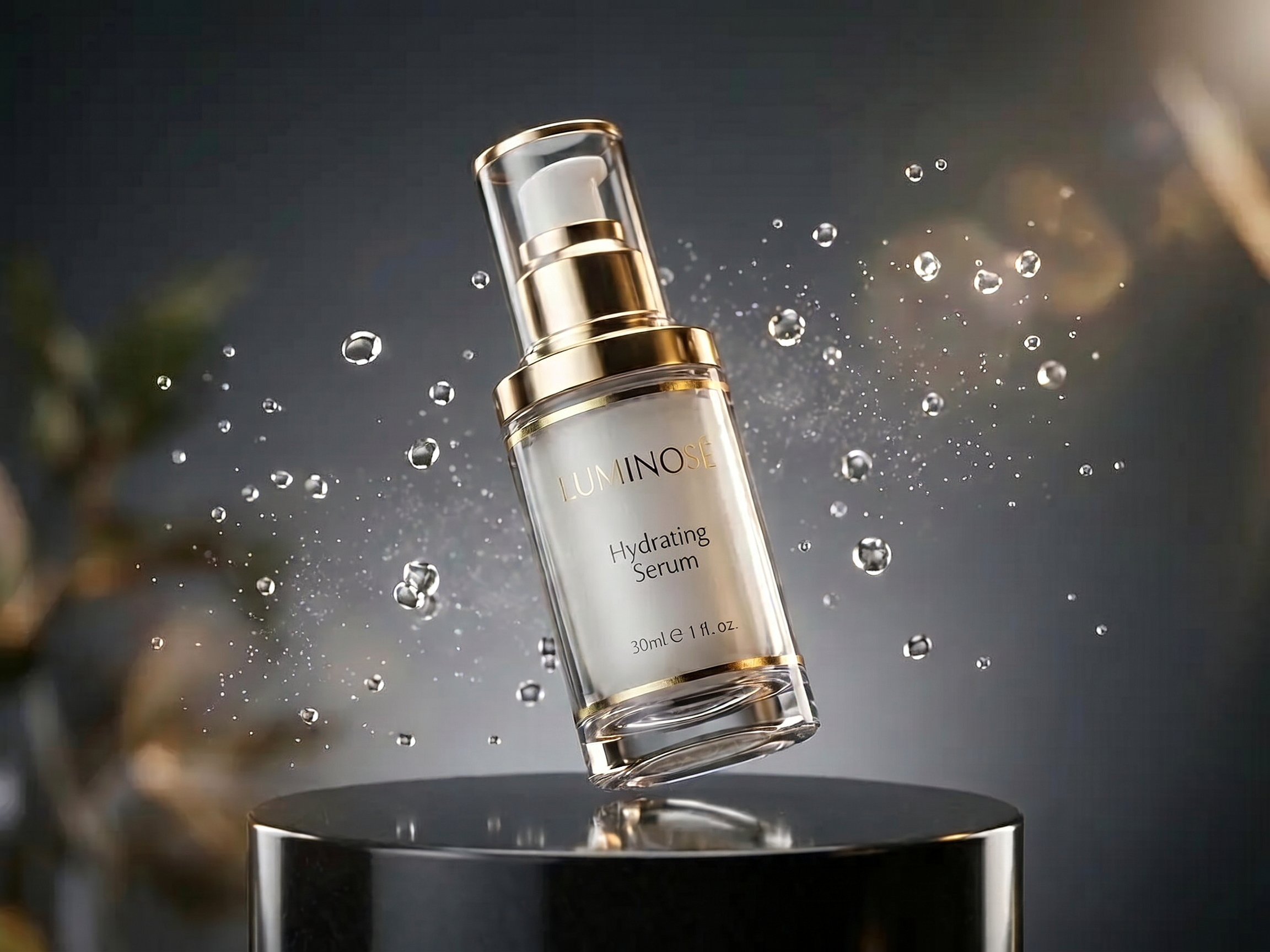
Skincare product image: gold, glass and suspended droplets
Local ComfyUI · MiniMax H3 Image reference-guided generation. A product study in materials, lighting and advertising composition, not a text-only result. Reference editing is not available in the public studio.
Original prompt:Edit <Picture 1>. Recreate this luxury skincare product advertisement as closely as possible. Preserve the same single clear cylindrical serum bottle, pearly ivory inner container, thick transparent base, polished gold neck and trim, white pump beneath a transparent cap. Preserve the bottle tilted with its top leaning left, hovering just above the glossy black circular pedestal and its reflection. Preserve the suspended clear water droplets, delicate mist, dark charcoal background, blurred green leaves at left and warm beige bokeh at upper right. Match the composition, camera angle, scale, lighting and realistic glass, gold and water materials. Keep the full bottle and cap visible. Preserve the label wording and typography from the reference: LUMINOSE, Hydrating Serum, 30ml. No new objects, no additional advertising text, no watermark. Landscape 4:3 luxury product photograph.
Observed limitations:Generated with the locally installed quantized H3 Image model in ComfyUI, using one supplied reference. The composition closely follows that reference; droplets, reflections and fine label lettering differ. Fine background texture is visible. Native 2304×1728 output, without an external upscaler or retouching. This is a reference-guided showcase, not evidence that the public text-only studio reproduces a specific product.
Generation limitations
This release does not provide image-to-image, image editing, batches, multiple references, custom sizes, 4K, masked editing or transparent backgrounds. Results can contain incorrect text, distorted details or an unexpected composition. Inspect each image rather than assuming that a prompt was fulfilled.
Private history and downloads
The first-release design saves task records and images to the signed-in account, with permission checks for preview and download. Private results are not automatically added to public examples. Prompts are sent to our connected ComfyUI generation service; avoid sensitive personal information.
From an image idea to a video
The workflow is AI Image → Image to Video → AI Video. Manually download a result, check the video tool’s upload requirements and upload it to the separate Image to Video tool. This is a manual handoff, not a new one-click feature; video credits still apply.
There is no single best choice for every task. Compare actual outputs, trial restrictions, supported sizes, privacy and usage terms. FreeVideo AI has no published image-quality benchmark; its image tool is available under introductory trial conditions.
How can I generate images from text?
A text-to-image tool turns a written description into a still image. Describe one subject and scene, choose composition and lighting, then select supported output settings. Use the studio when available and inspect the downloaded result.
How do I write better AI image prompts?
Use subject + setting + composition + lighting + visual style + essential constraints. Start with one clear image, change one detail at a time and check the output rather than assuming the request was followed. The practice prompts on this page have not been verified by generation.
Can I generate images without paying?
Free during the introductory period. Image generation costs 0 credits. Sign-in, one active task per account, submission pacing and queue-capacity limits apply. There is no promise of unlimited access or daily credit refreshes. Existing video credit costs do not change.
What image sizes and formats are supported?
The first release is limited to one image, 1K or 2K area levels, ratios 1:1, 16:9, 9:16, 4:3 and 3:4, and JPEG, PNG or WebP. An area level is not a fixed long-edge size; the result shows its actual pixel dimensions. Custom dimensions and 4K are not exposed here.
What is MiniMax H3 Image?
MiniMax-H3-Image is the official model name for a still-image generation model in the MiniMax H3 family. It is distinct from the video workflow on this site. Official model capabilities are broader than this first-release website interface and do not establish that every feature is offered here.
How can I use MiniMax H3 Image on FreeVideo AI?
When the studio is available, sign in, enter a prompt, select supported settings and submit one task. Wait for the result before creating another. This interface fixes the model and requests one image; it does not ask visitors for an upstream API key.
What are the limitations of this image generator?
The first release only supports text-to-image and prompts up to 2,000 characters. It does not offer image-to-image, image editing, batch generation, multiple references, masked editing or transparent backgrounds. Text, details and composition can be incorrect, and requests may queue or fail. No guaranteed quality, completion time or commercial license is promised.
Why might I have to wait?
High demand may lead to longer queue times. Thank you for your patience. Tasks are processed through a queue. Submit once and follow the saved status; a full queue may require trying later. No fixed wait time is promised.
Do I need to sign in?
Yes. Your account is used to save private history and check permission to preview and download results. Personal images are not automatically published as examples.
Is image generation the same as Image to Video?
No. Text-to-image produces a still image; Image to Video animates an input image. You can use a manually downloaded image as video input after checking the video tool’s upload requirements. No automatic transfer or one-click connection is provided here.
What does “result being checked” mean?
After an interrupted request, the upstream service may still be generating. The task is not automatically resubmitted. Keep the record and wait for reconciliation rather than repeatedly creating the same request.
FreeVideo AI is an independent service, not the official MiniMax website. Model capabilities and features available here may differ. Official model documentation
Free AI Image Generator | MiniMax H3 Image | FreeVideo AI
 FreeVideo AI